Role: UX/UI Designer
Focus: Product Efficiency and Error Reduction
Overview
Zebra needed a clearer, more reliable onboarding flow for connecting robotics hardware to WiFi—an essential first step in deploying and scaling fleet operations. My goal was to redesign the experience to reduce setup errors, support enterprise scalability, and improve user confidence during device activation.
Business Problem
Enterprises rely on fast, frictionless device onboarding to enable teams to deploy robots at scale. The existing setup flow struggled with:
- High user confusion during WiFi connection
- Frequent setup failures leading to support escalations
- Lack of clear feedback during QR scanning and network configuration
- Inconsistent UI patterns across the robotics suite
These issues slowed onboarding and increased operational costs.
Objectives
- Reduce onboarding time
- Minimize support interactions
- Improve accuracy during connection
- Build a UI system scalable to future robotics tools
My Role & Responsibilities
- Conducted UX audits using support data and internal interviews
- Mapped the full setup workflow and restructured the logic
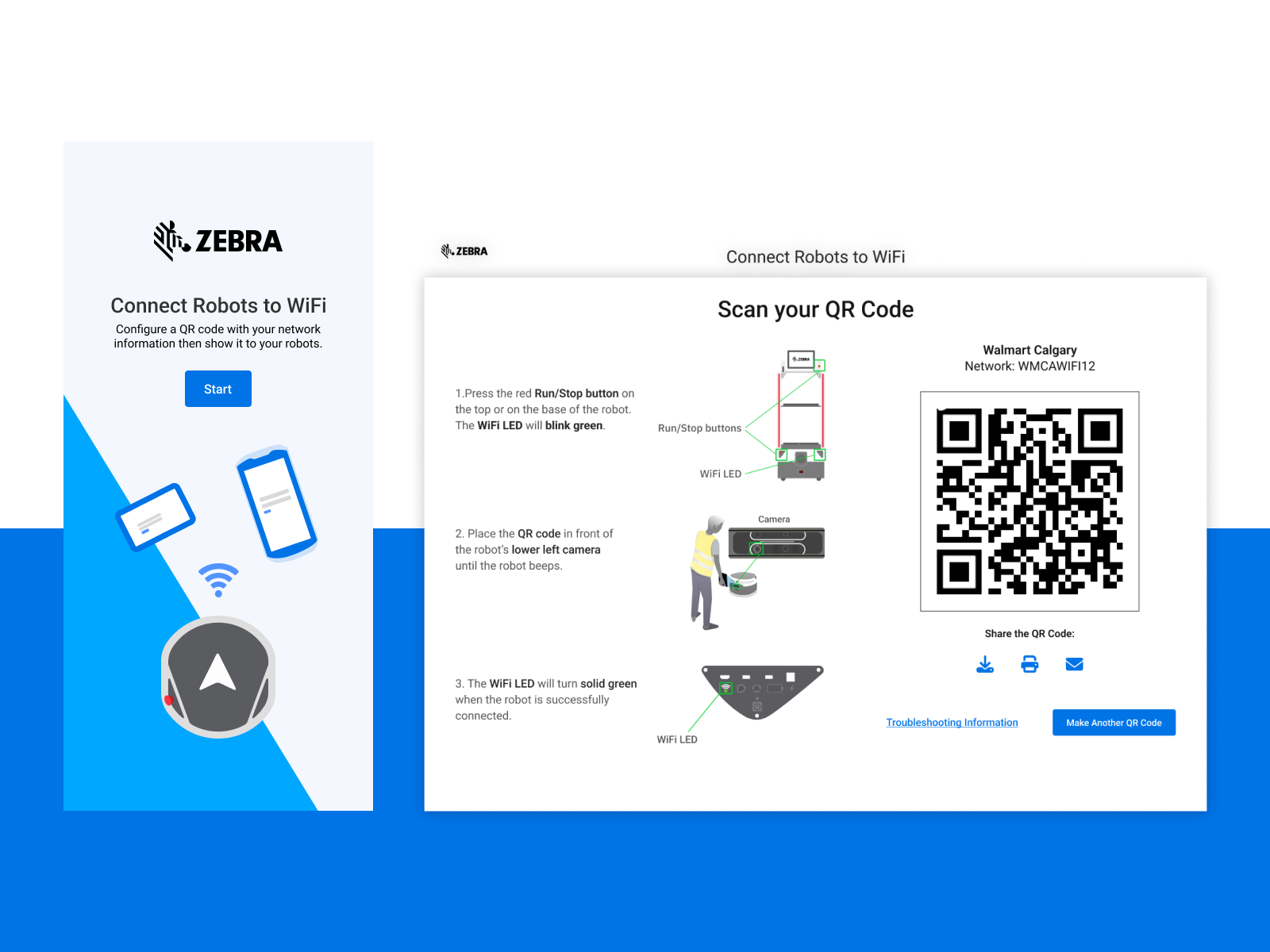
- Designed a simplified 3-step onboarding experience
- Created a modular UI system for scalable product expansion
- Collaborated with engineering for implementation and QA
Process
Research & Analysis
I reviewed support logs, identified failure patterns, and interviewed internal teams. Key insights:
- Users misunderstood the QR-based activation step
- Status messages lacked clarity and created uncertainty
- The UI didn’t align with Zebra’s design principles
Workflow Redesign
I created a streamlined flow:
- Select Robot → Scan QR → Confirm WiFi connection
This significantly reduced the cognitive load and number of screens.
Systemization
I built:
- Reusable components
- Standardized layout rules
- Status color system
- Scalable patterns for future robotics features
Final Designs
The final UI uses a modern, minimal look with strong hierarchy and step-based guidance. Scanning a QR code feels intuitive and provides immediate feedback. Users always know what’s happening and what’s next.
View prototype
Reflection
Outcome & Business Impact
40% reduction in WiFi setup failures
Faster onboarding (from 6 steps → 3 steps)
Fewer support tickets related to activation issues
Unified UI patterns adopted across other robotics workflows
Increased team velocity due to scalable UI components
What I Learned
This project reinforced that simplicity is powerful. When dealing with hardware or enterprise workflows, visual clarity and calm interaction flow dramatically improve user confidence.